
 Children with TBI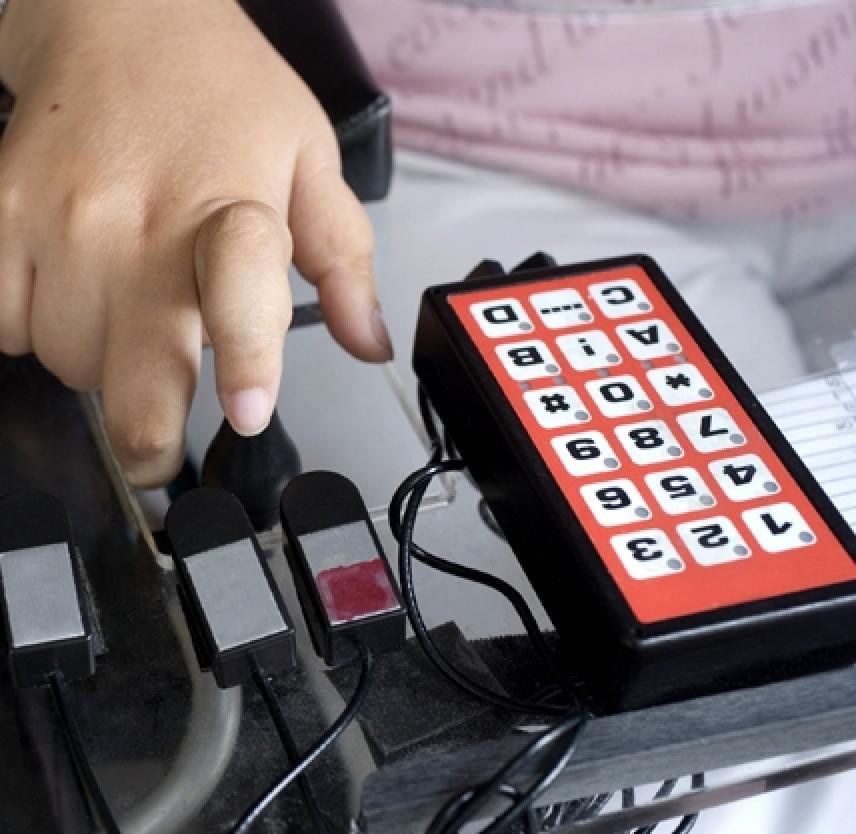
This glossary was created to help parents as they encounter various terms in the areas of special education, disabilities, and assistive technology. It is important for parents and guardians to understand the “language” of assistive technology in order to be informed advocates for their child’s technology needs.
Download a PDF of the glossary (includes images of some of the assistive technologies).
A
Access
The term “access” refers to the ability of any person or group to be able to have full use of a product or device, or full access to a service or environment. With full access to technology and services, people with varying abilities are able to participate successfully in school, at home, in the workplace, and in the community.
Accessibility Features
Accessibility features are options that allow a user to adjust a technology tool’s settings to their personal needs. Common accessibility settings adjust for an individual’s visual, mobility, hearing, language, and learning needs. On electronic print materials, font size and color may be changed, along with background color. Other print materials may be produced in large font or in Braille. A computer keyboard may be set to respond to levels of touch. Software can translate difficult words into easier ones or provide definitions throughout the text.
Accessible Design
Accessible design refers to the intentional designing of tools, services, and spaces to be accessible to everyone, with consideration given to the specific needs of those with cognitive, emotional, or physical disabilities. Examples of accessible design include a website that is compatible with text-to-speech programs or a building that is designed to be fully accessible to a person in a wheelchair.
Accessible Educational Materials (AEM)
Accessible Educational Materials (AEM) are resources used in education that are designed or adapted to be usable by everyone, including those with disabilities. AEM includes textbooks and other learning materials that are offered in alternative formats, such as audio files, large print, Braille, or digital text.
Accommodations
In education, accommodations allow a student to complete the same assignment, test, or activity as other students, but with a change in timing, formatting, setting, scheduling, or presentation. The material is the same, but a student learns the material in a different way. An example is extended time to complete a test.
Activities of Daily Living
Activities of Daily Living (ADL) include basic tasks such as eating, bathing, dressing, getting in and out of a chair or bed, and getting around at home and in the community. Many assistive technology devices are available to help people do a wide range of daily activities. Adapted spoons, weighted bowls, and clothing hooks are examples of low-tech AT. Electronic alerts, wireless controls of appliances, and devices that respond to voice controls are examples of high-tech AT.
Adaptive Technologies
Adaptive technologies are a type of assistive technology that include customized systems to help individuals move, communicate, and control their environments. These are designed specifically for persons with disabilities and include augmentative and alternative communication devices, powered wheelchairs, and environmental control systems.
Adult Services
After an individual reaches the age of majority (typically 18), services provided to them are considered adult services. This is significant because the individual will transition from a K-12 school setting with IEP services to receiving services as an adult. Some students may continue in a school-based transition program until they are up to 21 years old. An individual’s assistive technology does not automatically go with them when they leave the school setting, and must be considered within the context of adult services which are governed and administered by different laws and agencies.
Age of Majority
The age of majority is the legal age established under state law at which an individual is no longer considered a minor. In most states, this is 18, and an individual then has the right and responsibility to make their own legal choices as an adult. The parents/guardians of youth with disabilities may apply to delay this transfer of decision-making authority or to retain guardianship of their adult child.
Alternative Access/Input Devices
Devices in this category allow individuals to control their computers using tools other than a standard keyboard or pointing device, such as a mouse. Examples include alternative keyboards, electronic pointing devices, sip-and-puff systems, wands and sticks, joysticks, and trackballs.
Alternative Keyboards
Alternative keyboards are different from standard keyboards in size, shape, layout, or function. For example, the size of the letters on a traditional keyboard may be too small for someone who has a vision impairment but can be replaced with a keyboard that has color contrast and larger letters. The placement of letters may be changed for easier recall by individuals with learning disabilities.
Ambulation Aids
These devices help people walk and include canes, crutches, and walkers.
American Sign Language
American Sign Language (ASL) is a visual language that is communicated with hand and body movements and is used by many people who are deaf or hard of hearing.
Americans with Disabilities Act (ADA)
The American with Disabilities Act of 1990 prohibits employers from discriminating against people with disabilities and makes such discrimination a civil rights violation. Providers of public services, schools, public buildings and public transportation services also must provide accessibility to people with disabilities.
Android
Android is a mobile device operating system (OS) used in a wide range of smartphones and tablets. It is the most common mobile operating system in addition to Apple’s operating system (iOS).
App (Application)
The term app refers to an application, which is a program created to be used on a computer or mobile device. Apps cover a wide range of categories including learning activities, productivity tools, games, calendars, and organizational tools, many of which can serve as assistive technology.
Architectural Adaptations
Architectural adaptations are physical changes made in the home, school, workplace, or other areas to make those places more accessible to people with disabilities. Adaptations that remove or reduce physical barriers include ramps, lifts, lighting, altered countertop heights, and widened door frames.
Assistive Listening Device (ALD)
Assistive listening devices (ALDs) are used to aid individuals with hearing impairments to hear more clearly in public situations. The system can be set up to amplify the audio from televisions, radios, doorbells, and PA systems.
Assistive Technology (AT) Assessment
This functional evaluation focuses on an individual’s need for assistive technology to complete a specific educational, life skill, or vocational task. The evaluation should be conducted in the individual’s customary environments by a professional able to recommend a match between the features of an AT device and the individual’s strengths and weaknesses. The assessment should include input from the individual, family members, and teachers where appropriate.
Some people use the terms “assessment” and “evaluation” interchangeably, while others use “assessment” to refer to the process that takes place before an individual receives an AT device, and “evaluation” to refer to the process (and document) that identifies how well the device has worked for the individual.
Assistive Technology (AT) Device
An assistive technology (AT) device is anything that helps someone with a disability do some- thing they otherwise could not do. It helps them to increase, maintain, or improve functioning. It may be purchased commercially off the shelf, modified, or customized. The term does not include a medical device that is surgically implanted, or the replacement of such a device. AT devices range from low tech, such as a pencil grip or magnifying glass to high tech, such as an iPad or electronic communication device.
Assistive Technology (AT) Evaluation
See Assistive Technology Assessment above.
Assistive Technology (AT) Implementation
Assistive technology implementation refers to the ways in which selected AT will be put into use. An implementation plan may outline how and when the tool will be used, specific activities it will be used for, and potential training needs.
Assistive Technology (AT) Service
An assistive technology service is one that directly assists in the selection, buying, designing, fitting, customizing, maintaining, repairing, replacing, and coordinating of assistive technology devices. It also includes the training of students, teachers, therapists, and family members on the use and maintenance of the device.
Audio-Assisted Reading (AAR)
AAR is a technique used to assist or reinforce the reading of printed text with pre-recorded speech.
Audio-Supported Reading (ASR)
ASR is a technique used to increase reading proficiency (speed) of digital text by displaying portions of text simultaneously with synthesized speech. With a variable highlighting feature the user is able to choose the amount of text highlighted in the display (word, sentence, or paragraph).
Augmentative and Alternative Communication (AAC) System
An AAC system increases or improves the communication abilities of individuals with receptive or expressive language impairments. AAC technology spans a wide range of systems or products, from low-tech to high-tech, including sign language, picture boards, synthesized and digitized speech, mobile apps, and dedicated communication devices.
Auxiliary Aids and Services
Auxiliary aids and services assist professionals and organizations to communicate as effectively with people with disabilities as they do with others, which is a requirement under the Americans With Disabilities Act. These may include taped or printed texts, interpreters, or other methods of making materials equally available to everyone, including those with hearing, visual, or manual impairments.
Avatar
An avatar is a graphic representation of a person or character used in a computer program or video game.
B
Battery Interrupter
A battery interrupter allows a user to modify battery-operated devices for switch input. It is placed between the battery and its connection point in the battery compartment which can then be activated by pressing an attached switch.
Braille
Braille is a raised dot printed language used by many people with visual impairments. Each raised dot arrangement represents a letter or word combination.
Braille Display
A braille display is a tactile device consisting of a row of special soft cells covering 6 or 8 pins. The pins of each cell move up and down from electronic input and form a line of refreshable braille text that can be read by touch.
Braille Embossers and Translators
A Braille embosser transfers computer-generated text into embossed Braille output. Translation programs convert text, scanned in or generated via standard word processing programs, into Braille that can be printed on the embosser.
Braille Notetaker
A braille notetaker is a portable device with a refreshable braille display used by people who are blind or visually impaired. This device is the primary option available for people who want to read and write electronically in braille. Typically a notetaker allows the user to read and write files in a number of formats, listen to media files, handle email, and create voice memos.
C
Captioning
Captioning is a text transcript of the audio portion of multimedia products, such as movies, television programs and online videos. The captions appear on the screen and are synchronized with the visual events taking place. In addition to its usefulness for those with hearing impairments, it has been shown to be helpful to people with a range of visual and auditory processing problems, as well as those without disabilities.
Cause and Effect
In the context of education, cause and effect is the understanding that an action causes a reaction. It is a basic concept that children need to learn early in life. Uses of assistive technology for teaching cause and effect include a switch adapted toy that moves or plays music when a child pushes a button, or an iPad game where one action causes another. For example, if a student hits a switch and it makes a sound or animation on the screen they understand that it was their press of the switch that caused it.
Chromebook
A Chromebook is a basic, less-expensive laptop that is used to connect to the internet. It does not use a Windows operating system, but runs on Google’s Chrome OS.
Cloud-based
The term cloud-based refers to applications, services or resources that are stored in the cloud network and accessed via the internet. The cloud is a network of servers that store data that is then accessible from various platforms and devices. Common examples of cloud-based computing are Dropbox, Google Drive, and iCloud.
Community Participation
Community participation is a functional goal for most individuals with disabilities. To accomplish this goal, young people are encouraged to be interested in and taught how to engage in community-based activities. Assistive technology devices can be an important element in facilitating community participation.
Consideration of Assistive Technology (AT)
The consideration of assistive technology is a required part of the annual IEP process under the Individuals with Disabilities Act (IDEA). Consideration is generally a thoughtful conversation during the IEP meeting about whether a student needs an AT device or service in order to meet their educational goals. The consideration process should take into account the student’s strengths, challenges, learning goals, current accommodations, and behavior.
D
Daily Living Aids (DLA)
Daily Living Aids are assistive technology tools that help people with disabilities to be able to do activities such as eating, bathing, cooking or dressing. These aids may be low-tech such as adapted eating utensils or a button hook for dressing, or high-tech such as a voice-activated or smart device that can assist with activities in the home.
Descriptive Videos
Descriptive videos have been enhanced with narration for people with visual impairments. The narration describes visual elements of action, characters, and locations. Examples would include the color of clothing, the movement of characters across a room, or an item being held by a character. These descriptions are inserted into natural pauses in the program’s dialogue.
Device Agnostic
This term refers to the ability of an application to operate across a range of devices without a need for adaptations.
Digital Talking Book (DTB)
A digital talking book is a book that is encoded with recorded audio in human speech. The audio is synchronized with the text and may be accessed by a person with disabilities to increase the quality and availability of information.
Digital Text
Digital text is any text that can be retrieved and read by a computer or other electronic devices.
Digitized Speech
Digitized speech, also known as recorded natural speech, is human speech that has been recorded and can be played back. This is one kind of speech that may be used in alternative and augmentative communication devices.
Do-It-Yourself (DIY)
Do-It-Yourself or DIY refers to the method of building, modifying, or repairing things without the direct aid of experts or professionals. DIY solutions can be inexpensive and easy to make, such as using a tennis ball to create a pencil grip or building a writing slant board out of a cardboard box. As 3-D printers become widely available, many in the DIY (or “Maker”) community are using them to craft creative AT devices.
Due Process Hearing
Parents and/or guardians may request a due process hearing if they are unable to resolve differences with a school concerning the special education services, including assistive technology, being provided to their child. A due process hearing is more formal than mediation and the parties are generally represented by attorneys or advocates. An impartial hearing officer hears both sides of the dispute and issues a written decision, which may be followed by an appeal process.
Durable Medical Equipment (DME)
Durable Medical Equipment (DME) is any piece of equipment that is used to serve a medical purpose, lasts for a substantial period of time, and is appropriate for use in the home. DME includes devices, controls, or appliances needed for an individual’s medical care, including supplementary supplies and equipment necessary for the proper functioning of such items.
E
e-book
An e-book is an electronic book that can be accessed and read via a computer or other device. E-books serve as assistive technology when they are used by individuals who could not access their content in other formats, such as print.
Early Intervention Services
Early intervention services must be provided under the Individuals with Disabilities Education Act (IDEA), which addresses the needs of infants and toddlers with disabilities, from birth to age three. A grant program provides services for identification, assessment, and assistive technology with the outcome detailed in an Individualized Family Service Plan (IFSP).
Electronic Pointing Devices
These devices allow an individual to control the cursor and movements on a digital screen and include tools such as a mouse, joystick, and trackball. When used with an on-screen keyboard, electronic pointing devices allow the user to enter text and data.
Emotional and Behavioral Disorder (EBD)
An Emotional and Behavioral Disorder (EBD) is an emotional disability that interferes with a child’s educational performance. A child with an EBD displays emotional characteristics such as inappropriate behavior, an inability to relate to others, or pervasive mood problems. Students may be considered for special education services under the EBD category. Assistive technology that can be used to support students with EBD includes tools to help with behavioral control, understanding and expressing feelings, and managing attention.
Environmental Control Unit (ECU)
An ECU enables an individual to control electronic devices in their environment through alternative access methods, such as switch or voice access. ECUs can control things such as lights, televisions, telephones, music players, door openers, security systems, and kitchen appliances. These systems are also referred to as Electronic Aids to Daily Living (EADL).
Evaluation
An evaluation is a process in which a team of professionals (e.g., teachers, counselors, and/or service providers) determines whether a child is eligible for early intervention services (birth to three) due to a disability. The evaluation is necessary to determine a child’s eligibility for special education and other services.
Every Student Succeeds Act (ESSA)
The ESSA is federal legislation that replaced the No Child Left Behind Act in 2015. It outlines the federal government’s role in public education, including the requirement for standardized testing of students in grades 3 to 8.
Executive Function
Executive function is a set of mental skills that help us to control our thinking and behavior. These skills allow us to plan, focus attention, remember instructions, manage our time, self-regulate emotions and thoughts, and complete tasks. These skills are central to doing well in school and at work. Individuals with disabilities may have weak executive function skills which can be supported with assistive technology.
Extension (web browser)
An extension is an application or program that operates within a web browser. The extension offers additional features or capabilities, such as a spelling and grammar checker that operates within a browser like Google Chrome, Mozilla Firefox, or Safari.
Eye Gaze Board
An eye gaze board is a simple communication device with letters, numbers, or pictures mounted at strategic areas on the board. The user communicates by looking at select areas translated into words and sentences by a partner.
Eye Gaze / Eye Tracking Technology
Eye gaze or eye tracking technology is a way of accessing a computer or communication device by focusing the eyes on a picture or area of the screen. The technology is able to determine exactly where a user is looking and operates as an input alternative to a mouse and keyboard.
F
Family Educational Rights and Privacy Act (FERPA)
FERPA is a federal law that protects the privacy of students and their educational records. Along with IDEA, it protects the rights of students that receive special education services.
Fidgets
Fidgets are sensory objects or toys that children or adults can use to keep their hands busy in order to aid their ability to pay attention.
Free and Appropriate Education (FAPE)
FAPE is a requirement outlined in the IDEA law, which states that school systems must provide children with disabilities with special education services and accommodations, including AT, at no cost to the parents. The law does not say what is considered an “appropriate” education, but says that children must be taught in the most typical classroom setting possible, often referred to as the “least restrictive environment.”
I
Inclusion/Inclusive
Inclusion is the principle that people with disabilities should be able to participate in the same activities as their peers who do not have a disability. Examples of important activities to be evaluated for inclusiveness are public education, public transportation, accessing social services, having relationships, and participating in community events.
Inclusive Employment
This is a category of employment in which a person with disabilities works alongside people without disabilities with no major systemic supports. Assistive technology can be an important factor in helping an individual to function in an integrated employment setting.
Independent Living Centers (ILCs)
Independent living centers are community organizations that offer support services and ad- vocacy for people with disabilities to gain full access to housing, transportation, employment, recreation, and other services. The centers are also important resources for information and training on assistive technology.
Individualized Education Program (IEP)
Every child who receives special education and related services must have an Individualized Education Program (IEP). During the IEP planning process teachers, parents, administrators, support personnel, and students work together to improve educational outcomes for children with disabilities. The IEP process results in a document that includes information on present levels of functioning, future goals, and services to be provided. By law, the IEP process must consider the need for assistive technology to support student learning. If documented in the IEP, schools must provide the identified AT tools and services.
Individualized Family Services Plan (IFSP)
Like an IEP, an IFSP is a written statement about the developmental needs of an infant or toddler (birth to age three) with disabilities. The IFSP outlines developmental status, the family’s ability to support learning and development, and desired outcomes for the child. Assistive technology that can support the child’s development must be considered. The IFSP describes the services the child will receive, how these will be delivered, and how the child will transition to his next environment.
Individualized Transition Plan (ITP)
The ITP is the section of a student’s IEP that focuses on the issues related to the transition from high school to higher education, employment, or independent living. The ITP should identify the child’s interests, goals, current educational status, current and projected assistive technology needs, and the steps needed to help the student move from the high school setting to independent living as an adult.
Individuals with Disabilities Education Act (IDEA)
IDEA is federal legislation intended to ensure that all children with disabilities have access to a free appropriate public education (FAPE) with special education and related services that meet their individual needs. IDEA requires that assistive technology be considered during the development of a student’s individualized education program (IEP). If AT is determined to be necessary, the school system is responsible for providing the AT device(s) and/or service(s).
Infrared Sender/Receiver
This device is commonly found in an environmental control unit (ECU). An infrared signal is sent to the control unit, which then sends a signal to the appliance. These are usually small and portable and can be used in different areas of a room.
Integrated Employment
This is a category of employment in which a person with disabilities works alongside people without disabilities with no major systemic supports. Assistive technology can be an important factor in helping an individual to function in an integrated employment setting.
Internet of Things (IoT)
This term refers to the smart devices that are interconnected via the Internet. This offers great potential for automating many daily living activities which can reduce strain for those with disabilities. One example is the Amazon Echo which operates via voice commands.
Interoperability
This term refers to the ability of a technology device or computer system to connect and function with other types of systems or hardware.
iOS
iOS is Apple’s operating system for mobile devices, such as the iPhone, iPad and iPod.
iPad
An iPad is Apple’s touch screen tablet that is used with a wide range of apps.
iPhone
An iPhone is Apple’s smartphone that operates as a cell phone, camera, mobile web browsing device, and GPS device.
J
Joystick
A joystick is an alternate input device connected to a computer that controls the cursor on the screen. It offers an alternative for people with a disability that makes it difficult to use a mouse or keyboard.
K
Keyboard Additions
Keyboard accessories have been designed to make keyboards more usable for people with disabilities. These include: keyguards (hard plastic covers with holes for each key), moisture guards (thin sheets of plastic that protect keyboards from spills and saliva), and alternative labels which add visual clarity or tactile information to the keys.
Keyboard Emulator
A keyboard emulator is a device that is connected to or resides in a computer and imitates the computer’s keyboard in function and performance.
L
Least Restrictive Environment (LRE)
The phrase ‘least restrictive environment’ refers to a requirement outlined in the IDEA legislation that states that, to the maximum extent possible, children with disabilities be educated with children who do not have disabilities. Removal from a general educational classroom should occur only when a student cannot be successfully taught in that setting even with assistive aids and services.
Learning Disability (LD)
A learning disability is a broad term referring to a range of learning or processing differences. The skills most often affected are reading, writing, reasoning, and math. Examples of learning disabilities and their associated areas of difficulty are dyslexia (reading), dysgraphia (writing), and dyscalculia (math). Assistive technology is an important consideration for supporting students with learning disabilities.
Learning Management System (LMS)
A learning management system is a software program that a school uses to deliver course material, track assignments, and maintain educational records. They often offer students and their parents the ability to access information online. Examples include Blackboard, Moodle, and Canvas.
M
Mediation
Mediation is a process to resolve disagreements between parents and school personnel about special education or assistive technology services being provided to a child. It is provided at no cost to the family or the school district. Both parties must agree to mediation. A neutral trained mediator facilitates the meeting to help both parties resolve their disagreements. Mediation is more structured than conciliation but less formal than a due process hearing.
Mobile Device
A mobile device is a computing device that is small enough to carry with you, often with a touchscreen and wireless access to the Internet, such as a smartphone or tablet.
Mobility and Transportation Aids
This category of AT includes products that help mobility-impaired persons move within their environment and have independence in personal transportation. These include standing or walking aids, transfer aids, stair lifts, walkers, scooters, wheelchairs, adapted bikes, car seats or beds, stretchers, ramps, strollers, adapted driving controls, and vehicle conversions.
Modifications
In education, modifications adjust an assignment, test, or activity in a way that changes the standard or alters the original measurement. Modifications change what a student is taught or expected to learn. Examples include a shorter reading assignment or an alternate assessment.
Mouse
A computer mouse is a pointing device moved by the hand to navigate to items on a computer screen. The buttons on a mouse are used to click on items. A wide variety of adaptations or alternative mice have been developed to address a range of access needs.
O
Online Community Support
Online community support includes websites, listservs, and other online ways for people to communicate with each other about a topic of mutual interest. An online community can offer both information and support to people who may not able to get together in person, such as people with mobility challenges or busy parents of children with special needs. Some examples include Facebook, Twitter, and blogs.
Onscreen Keyboard
Onscreen keyboards are software-generated interactive images of a standard or modified keyboard viewed on the computer screen. The keys are selected by a mouse, touch screen, or other electronic pointing device.
Optical Character Recognition and Scanners
Optical character recognition (OCR) applications work with a scanner or device camera to convert text from a printed page into a digital text file. With OCR, the resulting digital text can be accessed for text-to-speech or edited and saved as a text document.
P
Personal Assistance Services (PAS)
Personal assistance services help people with disabilities complete daily tasks needed for successful participation in school, work, and community living. They include, but are not limited to, dressing, eating, personal hygiene, shopping, and home/office organization. Assistive technology can play a role as a complement or alternative to the need for personal assistance services.
Pointing and Typing Aids
A pointing or typing aid is typically a wand or stick used to make selections on a touch screen, or to strike keys on the keyboard. They are most commonly worn on the head, held in the mouth, strapped to the chin, strapped to the arm/wrist, or held in the hand.
Portable Word Processor
A portable word processor is a lightweight, inexpensive device that can offer access to word processing with a keyboard and small screen for viewing text. This can provide a writing tool free of Internet distractions. Text can be downloaded from the device to a computer or to a printer for saving and printing.
Positioning Supports
These devices provide support for people with disabilities to be positioned in a specific way in order to engage in an activity. Examples include positioning rolls, wedges, underarm supports, or specially designed chairs.
Post-secondary Accommodations
Post-secondary accommodations in educational settings typically include: 1) modifications to the curriculum or educational tasks in college-level coursework or vocational training, and 2) services or assistive technology tools that help a student better access course material, participate in class, and submit assignments. Post-secondary accommodations in the workplace include equipment and services that help an individual to get and keep a job. They include assistive technology, modifications to tasks, and changes to the workplace environment.
Post-secondary Education and Activities
Pos-tsecondary education, also called higher education, is formal education that is pursued after completing high school. Examples are vocational programs, community college, four-year college or university, and continuing education. Many colleges and universities have programs designed to support students with special physical, cognitive, and behavioral needs. Post-secondary activities include any formal or informal activities that a child with disabilities pursues after leaving high school. These may include education, employment, recreation, independent living, and community participation.
Promotion of Independence
This principle advocates for helping people with disabilities to be as independent as possible. Assistive technology can play an important role in this.
Prosthetic and Orthotics
Prosthetics and orthotics include replacement, substitution or augmentation of missing or im- paired body parts with artificial limbs or other orthotic aids. This includes splints, braces, foot orthosis, and more.
R
Receiving Environment
The receiving environment is the new setting to which a child with disabilities is transitioning. For example, if a child is going from elementary school to middle school, the middle school is the receiving environment. Planning for the child’s transition to a new environment must include a consideration of new assistive technology needs.
Related Services
Within in the context of special education, related services are any additional support services that a child needs in order to benefit from his or her education. Such services include: transportation, medical evaluation, parent counseling, speech pathology, psychological services, physical and occupational therapy, and recreation.
S
Scan and Read Program
A scan and read program is software that converts scanned documents into text that can be read aloud and edited. Often additional study tools and supports are provided in this kind of software. This software uses optical character recognition (OCR) technology.
Scanning
Scanning is an electronic selection technique often used with switch access to choose an item from a group of items. The program highlights the options available to the user, who then selects the desired action or item.
Screen Enlargement Programs
Screen enlargement programs magnify an electronic screen, increasing visibility for users with a visual impairment. Most programs have variable magnification levels and some offer text-to-speech options.
Screen Reader
A screen reader is an application that uses synthesized speech to “speak” graphics and text aloud. This type of application is used by people with a print disability, such as blindness or low vision.
Seating and Positioning Aids
Seating and positioning aids offer modifications to wheelchairs or other seating systems. They provide greater body stability, upright posture or reduction of pressure on the skin surface. Equipment includes wheelchair cushions, trunk/head supports, modular seating, and seating lifts.
Section 504 Plan
Named for Section 504 of the Rehabilitation Act, a part of civil rights law, a 504 plan is an education plan for an individual student, that is an alternative to an IEP. Section 504 regulations require a school district to provide a free appropriate public education (FAPE) to each qualified student with a disability, regardless of the nature or severity of the disability. For those students that qualify, a 504 plan outlines accommodations and modifications, including assistive technology, needed for the student to receive a free appropriate public education.
Sensory Toys
Sensory toys are objects that provide tactile or visual input that helps individuals with sensory needs to feel calm, function, and self-regulate in areas such as focus, behavior, and emotion. Some sensory toys are also excellent fidgets which can improve concentration and focus in individuals with attention difficulties. Examples include water beads, squishy balls, and thinking putty.
Sheltered Employment
Also known as extended employment, sheltered employment takes place in a facility that is dedicated to employing persons with disabilities who need extensive supports in order to work.
Smart Device
A smart device is an electronic device that is linked to other devices or the Internet through wireless systems such as Wi-Fi, Bluetooth or 4G/3G. Smart devices are used to control or monitor activities, often paired with a mobile app. Examples include smartphones, fitness trackers, biofeedback devices, home automation devices that control outlets or appliances, and voice-activated devices such as the Amazon Echo.
Smartphone
A smartphone is a cell phone with many capabilities of a computer that is generally connected to other devices or networks via Wi-Fi, Bluetooth, or 4G/3G. A smartphone typically has a touchscreen, internet access, and the ability to run downloaded apps.
Stylus
A stylus is a pen-shaped tool designed to be used with a touchscreen, such as with a tablet. A stylus can offer greater accuracy than using a finger.
Summary of Performance
A summary of performance is an overview of a student’s academic achievement and functional abilities. It includes recommendations to help the student meet his or her post-secondary goals.
Supported Employment
Supported employment occurs in a typical work setting where people with severe disabilities receive individualized supports that enable them to become successful members of the workforce. These ongoing support services allow a person to perform a job with assistance that may include a job coach, transportation, assistive technology, specialized job training, or individually tailored supervision.
Switches and Switch Software
Switches offer an alternative method of providing input to a device or computer when it is not possible to use a standard button, keyboard or mouse. Switches come in various sizes, shapes, and methods of activation. Examples of switches include a large button pressure switch, a lever switch, a squeeze switch, and a proximity switch. Switches can be used to control many devices including adapted toys, communication devices, and computers.
Synthesized Speech
Synthesized speech, also known as computerized speech, is a computer programmed voice that attempts to simulate the human voice. There are a variety of different synthetic voice options. Synthesized speech is commonly used in text-to-speech programs, communication devices, and automated speaking systems.
T
Tablet
A tablet refers to a tablet computer which is a mobile device with a touchscreen display. Examples include Apple’s iPad, Window Surface, and Amazon’s Kindle Fire.
Talking Word Processors
Talking word processors are writing applications that provide speech feedback as a student writes. Students often find that having written material read aloud helps them to better edit and understand their writing.
Technical Assistance
Technical assistance is a set of informational, educational, and related services intended to help an individual or organization build capacity and/or achieve goals.
Text Expansion
This program feature automatically expands abbreviated words or phrases based on pre-programmed commands entered by the user. The abbreviation expansion allows the user to minimize the number of keystrokes necessary in order to write more efficiently. It can be combined with word prediction programs to aid in the writing process. For example, the key combination “AT” could become “assistive technology”.
Text-to-Speech
Text-to-speech applications speak aloud digital text, including documents, web pages, PDF files, and emails. Developed for individuals with low vision or blindness, text-to-speech can also be useful for people with learning disabilities, such as dyslexia.
Touch Screens
A touch screen is built into an electronic device, such as a mobile device or computer monitor, and allows direct selection and interaction through a touch or gesture on the screen.
Trackball Mouse
A trackball is an alternative mouse with a sphere or ball that is rotated by the fingers to move the cursor on the screen. A trackball can have ergonomic benefits or be more accessible as it is controlled by finger movement rather than hand and arm movement.
Trackpad
A trackpad or touchpad is an electronic pointing device with a flat area that senses touch and is used to interact with a computer screen. It is often used as an alternative to a mouse, especially on laptops.
Transition
Generally, transition describes a process of major change from one set of circumstances to another. For children with disabilities, transitions represent an important time to consider assistive technology that may be needed in their new setting. Significant transitions occur when a child moves from early childhood settings (e.g., home or daycare) to school and, later, between school phases (e.g., middle school to high school) or from secondary school to post- secondary education, work and/or community living.
Transition Services
In the context of an IEP, transition services help a student prepare to move from a K-12 school setting to post-secondary environments, including college, vocational training, employment, adult services, and independent living. Transition services should also include consideration of and planning for accommodations and assistive technology that may be needed at school or in the work place.
Traumatic Brain Injury (TBI)
A traumatic brain injury occurs when a bump or blow to the head causes damage to the brain. A TBI may result in a disability with cognitive, emotional, sensory, and motor impairments.
TTY (TeleTYpe) / TDD (Telecommunications Device for the Deaf)
This is a telecommunications device for people who are deaf. TTY/TTD is a device with a keyboard that sends and receives typed messages over a telephone line.
U
Universal Design (UD)
This is an approach to the design of products and environments that is aimed at making them accessible to all people, both those with and without disabilities. Examples of universally designed environments include buildings with ramps, curb cuts, automatic doors, widened doorways, and door levers (rather than knobs).
Universal Design for Learning (UDL)
Universal Design for Learning is the design of instructional materials and activities to be accessible to all individuals regardless of disabilities or learning styles. The goal of UDL is to support the learning goals of individuals with wide differences in their abilities to see, hear, speak, move, read, write, understand English, organize, engage, and remember. UDL involves flexible curricular materials and activities with built-in alternatives for students with differing abilities.
USB (Universal Serial Bus)
A USB is a common interface that enables different devices to connect and share information with each other. Examples include USB ports on personal computers, peripherals such as a mouse or keyboard, and other media devices.
USB Flash Drive: (aka USB stick, thumb drive, jump drive, or USB memory)
A USB flash drive is a small portable memory device that stores files and can be accessed by inserting the device into a USB port on a computer or other device.
V
Video Conferencing
Video conferencing allows multiple people to participate in a meeting with shared audio and video. This remote method of communicating with others can be helpful for people with disabilities that may not be able to physically attend a meeting.
Video Modeling
Video modeling is a visual teaching method in which an individual watches a video of someone modeling a targeted behavior or skill and then imitates the behavior or skill. This method can be helpful for teaching appropriate behavior to individuals with autism spectrum disorders.
Video Phone
A video phone has a screen that permits users to conduct real- time audio and visual conversations. It is useful for those who use sign language to communicate and for individuals who do not have access to medical and diagnostic personnel.
Vocal Output Communication Aid (VOCA)
A Voice Output Communication Aid (VOCA) is an electronic device that generates spoken language for individuals who are unable to use natural speech to express their needs and to communicate with others during a conversation. As an AAC system, it is used to supplement or replace speaking for those with speech impairments.
Vocational Assessment
There are two types of vocational assessment: functional and ecological. A functional vocational assessment is an evaluation of a person’s ability and desire to do a job by observing performance on various tasks in a variety of settings. An ecological vocational assessment focuses on particular employment tasks within a designated job site to determine whether the person with disabilities can perform those specific tasks and if so, with what accommodations or assistive technology supports.
Vocational Rehabilitation (VR)
Vocational rehabilitation services, sometimes referred to as “Voc Rehab,” are services provided to individuals with disabilities that help them develop the skills and motivation to find, secure and hold a job. These services are provided by publicly-funded regional vocational rehabilitation agencies. Vocational rehabilitation services help young people with disabilities to make a successful transition from high school to job training or college, employment and independent living. The consideration of ways that assistive technology can help to meet these goals should be a part of this planning process.
Voice Banking
Voice banking allows a person to record a set list of sounds and phrases with their own voice, while they still have the ability to use their voice. The recording is then converted digitally to create a personal synthetic voice that can be used in speech-generating devices when they are no longer able to speak. Voice banking is typically used by someone who has been diagnosed with a condition that is known to lead to loss of speech.
Voice Recognition (aka Speech Recognition)
Voice (or speech) recognition applications allow the user to speak to the device, such as a computer or mobile device, instead of using a keyboard to compose digital text. Some voice recognition applications also provide features to control functions on a computer or mobile device. Voice recognition systems can be used to create text documents such as letters or email, to browse the internet, and to navigate menus, and control applications. Examples include writing by dictation with Dragon Naturally Speaking and speaking commands to Siri on an iPhone.
W
Wearables
Wearables are clothing and accessories such as watches that incorporate computer technologies that give a user feedback on their actions or allow them to interact with other technologies. Examples include Apple’s iWatch, wearable GPS trackers, and a necklace with a personal amplifier.
Web Accessibility
Universal accessibility to the internet means that all people, regardless of their physical or developmental abilities, have access to web-based information and services. Making web pages accessible is accomplished by designing them to work with adaptive technologies, such as screen readers. It also means making color, font size, and page design decisions that make it possible for the widest range of individuals to access the information.
Word Prediction
Word prediction applications allow the user to select a desired word from an on-screen list located in a prediction window. The application generates a list of predicted words based on the letter(s) a user enters; continuously changing the list as new letters are entered. The word may then be selected from the list and inserted into the text by typing a number, clicking the mouse, scanning with a switch, or touching the touchscreen. This feature can be beneficial for students with learning disabilities or fine motor impairments.
X
X-10
X-10 is a communication protocol that allows compatible electronic devices to trans- mit or receive signals using the existing electrical wiring in one’s home. Most X-10 compatible units are inexpensive and, because they use existing wiring, do not require costly rewiring. X-10 technology is used for standard devices such as light switches or motion sensors, and is also being used for some smart home automation devices. Newer X-10 devices may be based on wireless communications.
The Center on Technology and Disability (CTD) helps children and youth with disabilities and their families, teachers, and service providers by providing a wide range of resources on assistive and instructional technology tools. CTD is funded by the U.S. Department of Education, Office of Special Education Programs (OSEP) under award #H327F130003.